
Overview
Voicegain has partnered with OrecX and is using the OrecX Avaya SIPREC solution to get access to the live audio stream that is fed to the real-time Transcription (and optionally to real-time Speech Analytics).
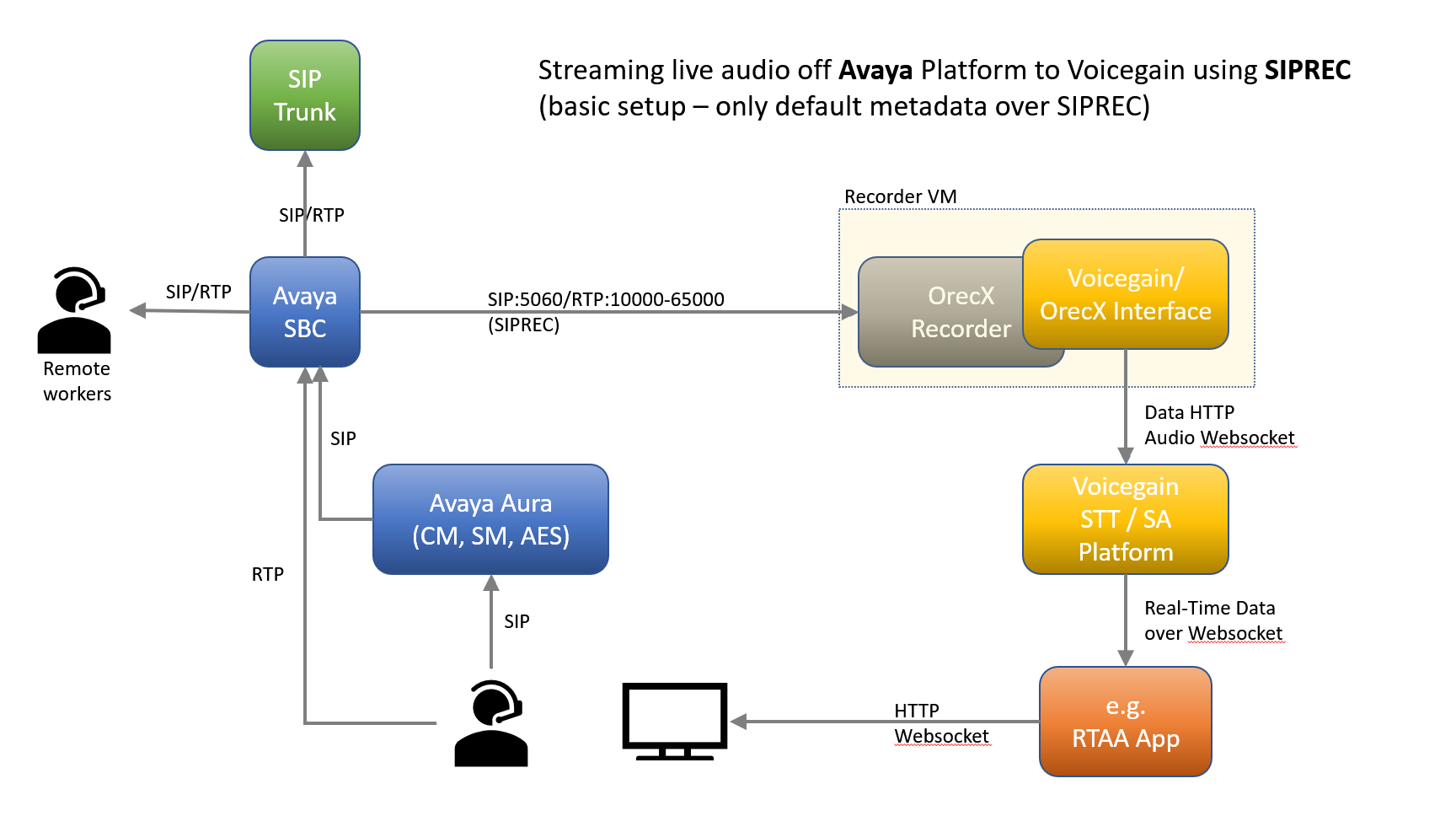
This solution allows enterprises with Avaya Aura or IP Office to stream calls via RTP where SIP trunk services are used – calls are streamed via SIP messaging sent by the Avaya SBC. The SBC delivers audio sessions to OrecX, and TSAPI metadata is provided via SIP messaging (basic metadata as part of SIPREC) and via CTI (additional metadata).
Two possible setups
SIPREC only
Below is the simplest setup just the SIPREC - all metadata that gets received comes from SIPREC.
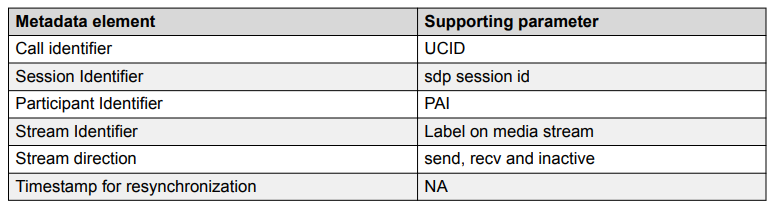
The default call metadata available with just SIPREC is listed below:
SIPREC + CTI
To obtain additional metadata additional CTI component is required as illustrated below:
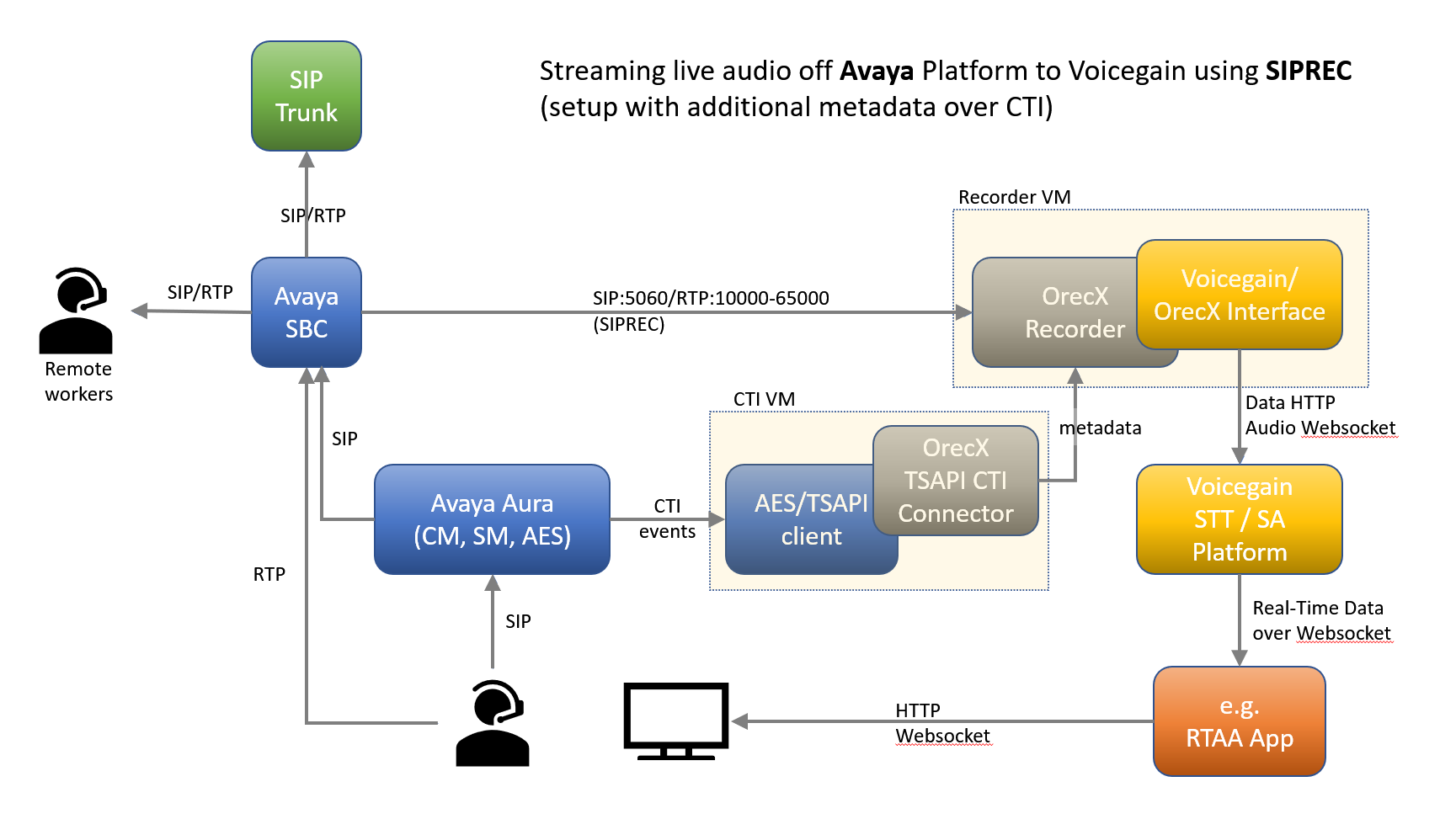
Extra metadata added via CTI comprises:
- Agent ID extension as opposed to the physical phone extension provided by default
- VDN - local entry point
- Split - or Skill
- UICD - unique identifier that stays the same over multiple call legs of the same call
- Trunk and group member (for TDM)
- Call direction (useful for port-mirroring- based capture)
Configuration Details
Configuring OrecX
OrecX setup has two components:
- (required) OrecX Recorder - it receives the call audio (over RTP) and basic call metadata (over SIPREC)
- (optional) OrecX CTI - needed to access metadata not provided by SIPREC.
Configuration of both the OrecX TR server and the OrecX CTI Connector will be performed by Voicegain.
The Recorder VM will be sized according to the expected number of concurrent sessions and will be setup with:
- OrecX recorder
- Correct plugin for ASBCE SIPREC will be enabled
- A web hook that will start a new Voicegain session (either Transcription or Speech Analytics) upon each new call. Sessions will be created under your Voicegain Account and in your chosen Context.
- Metadata associated with the call will be passed to the Voicegain session.
- A web hook to stream audio of each call to the previously started session.
Because our main goal is to get the live audio stream, the OrecX recording will be setup with a short retention period - the recordings serve mainly for debugging any issues and also as a short-term backup to allow reprocessing of any calls if needed.
Optionally, the smaller CTI VM will be configured:
- with the CTI connection parameters and credentials
- list of devices to be monitored
- correct connection parameters to the OrecX recorder
Configuring Avaya
Required versions: SBC should be 7.0+, as for CM/SM/AES, all versions from the last 10 years are suported.
For the details of configuring the Avaya please refer to the following OrecX and Avaya documents:
- Avaya SBCE SIPREC Configuration for Oreka Audio Recording - how to prepare an Avaya Enterprise SBC (ASBCE) for live streaming by OrecX, via the SIPREC recording interface on the ASBCE. It assumes that Avaya Communication Manager, Session Manager and SBCE are pre-configured properly and you can make calls from local endpoints to the SIP Trunk through the SBCE.
- Ports that need to be open between Avaya and OrecX Recorder VM are:
- TCP 5060 for SIP (TCP SIP is preferred to UDP SIP)
- UDP 5050 for SIP and range 10000-65000 for RTP (audio)
- NOTE: Voicegain will provide the IP address for the Oreka SIP trunk.
- Ports that need to be open between Avaya and OrecX Recorder VM are:
- (optional) Avaya TSAPI CTI Connector Deployment Guide for Oreka TR - Avaya AES/TSAPI can be used to enrich the metadata as well as ensure correct segmentation of recordings, so that there is one recording per intervening agent.
- Avaya TSAPI Basic User License is required to configure this CTI connector
- Configure Avaya Aura™ Application Enablement Services - start with Section 5 of the linked document (the earlier sections cover Port Mirroring based recording solution rather than SIPREC).
- Learn more about Avaya Application Enablement Services from this Avaya document.
Comments
0 comments
Please sign in to leave a comment.