
What is a Language Model?
The Language Model that we are talking about in this article needs to be distinguished from the large vocabulary language model contained in the core Voicegain recognizer. The model we are talking about here is a either a user-defined Language Model or one of the predefined Language models offered as built-in Language Models (these being created the same way as the the user-defined Language Models).
These Language Models can be thought as an overlay over the large vocabulary language model in the recognizer, used to modify the recognition result.
When to use a Language Model
Language Model is in particular useful for scenarios where a lot of transcription from the common domain needs to be performed. For example, suppose that one wants to use Voicegain Recognizer to transcribe Chemistry lectures. Out of the box the recognizer may make mistakes on the chemistry specific phrases and jargon. One could use hints to fix some mistakes, but a more powerful mechanism to improve recognition is to use a Language Model constructed specifically for the chemistry domain.
Note: currently the Language Model is very "strong" compared to the language model in the core neural network of the recognizer which in practice means that if you use a very simple Language Model compared to the speech that you want to transcribe then the transcript accuracy will be low. We are working on a feature that will allow you to balance the strength of the Language Model to your need - see the last Section in this article.
How to build a Language Model
Currently, a Language Model can be built from multiple so-called corpus files, each corpus file containing a large section of text. Note that while the number of hints is limited to 50 per request, a Language must contain at least 100 words for it to be built (this number is going to increase).
In the above scenario of transcribing Chemistry lectures, a good method of obtaining the corpus for the model would be to find transcripts of the Chemistry lectures from prior years. One could also add a text of a chemistry textbook, etc.
The corpus text that is being uploaded needs to be in UTF-8 encoding.
Here is a command that can be used to check if file is UTF-8:
iconv -f UTF-8 my-corpus-file.txt > /dev/null; echo $?
If it returns 0 then then text file is in UTF-8.
Additional methods to build a Language Model (coming soon)
Apart from building a Language Model from Corpus files, we will soon be adding ability to build them from a list of phrases, each phrase potentially having multiple class placeholders. Below is an example of some phrases that will be possible.
- I would like to transfer <amount> Rupees to my account.
- I want to book a flight to <destination-city>
- i want to book a flight to <airport-code>
Building Language Models using an API
The relevant API are documented on our Web Console: Voicegain Cloud Portal. You need to be logged in to see details.
You can create a new Language Model using: POST /model/lang
Then you can add one or more corpus files using POST /data/file and then PUT /model/lang/{uuid}
Finally you can build the model to make it ready to use using PUT /model/lang/{uuid}?build=true
Building Language Models using Web Console
Web Console has an entire page just for managing and building the Language Models
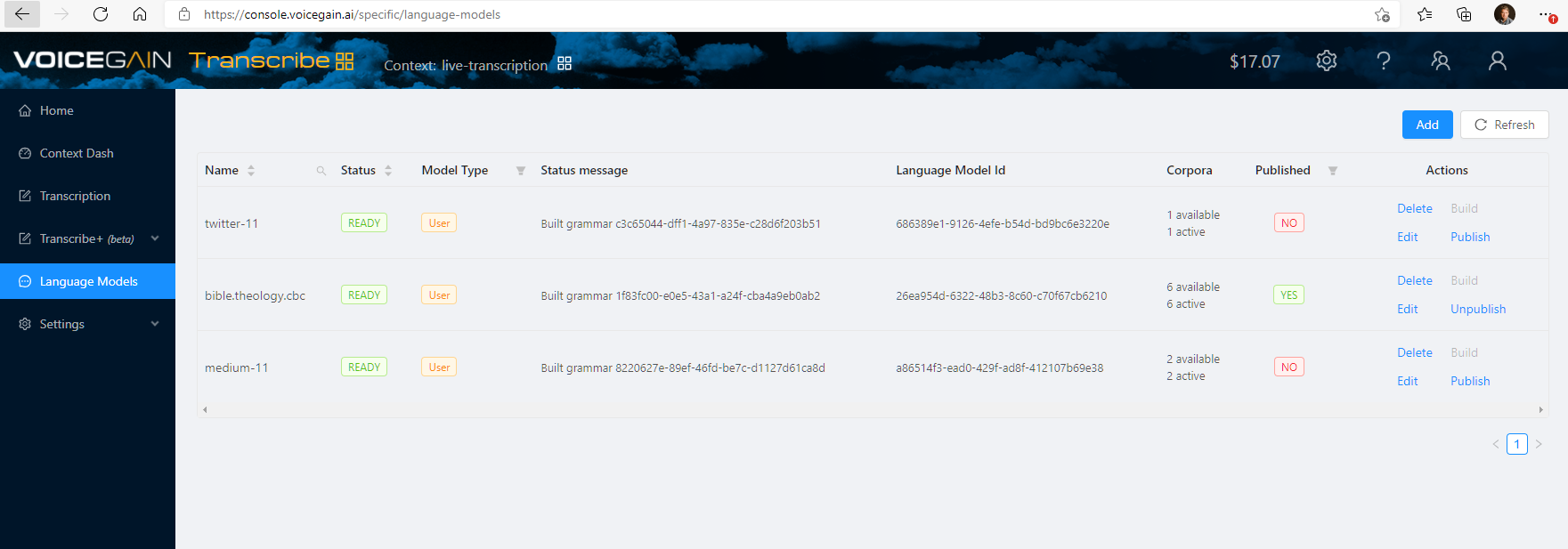
Language Models are created using the Add button. Initially the model is empty and you have to click Edit to open a window where you can add or remove corpus files. After those changes the model status will be Modified. You need to click Build to build the model and make it ready for use (status will change to Ready when build is complete).
Using Language Models
Generally Language Models will be used for multiple transcriptions from the same domain. It is convenient to set the Language Model that you want to use as a default model on the Context from which you take the JWT for the requests. This is easily done in ASR Settings.
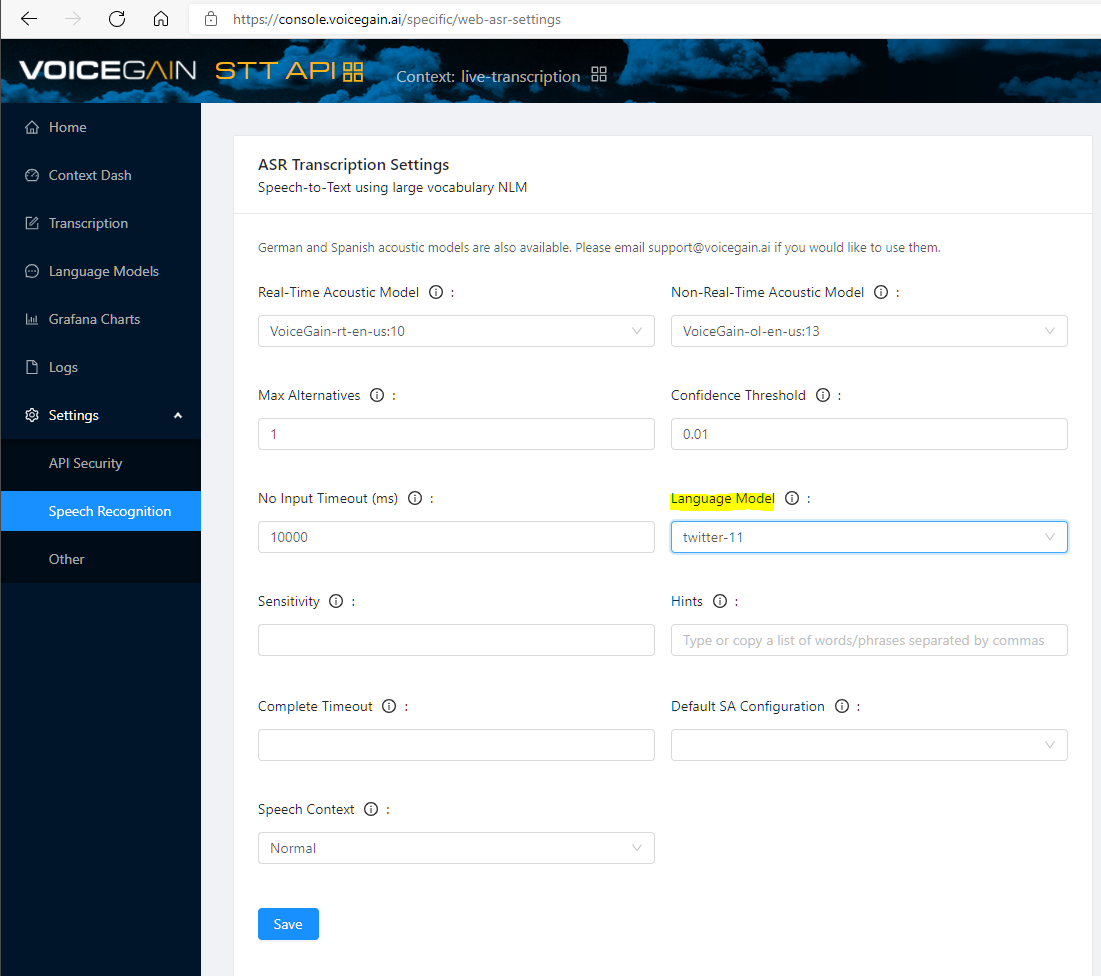
Language Models in API requests
If you have set the Language Model on the Context then it will automatically be used when you use the Context's JWT in your API requests.
You can also pass the Language Model ID in the transcribe request. Example below shows Language Model used in combination with Hints.
  ...
  ,
  "settings": {
    "asr": {
      "speechContext" : "normal",
      "noInputTimeout": -1,
      "completeTimeout": -1,
      "sensitivity" : 0.5,
      "hints" : ["Max_Kellerman:10, James_Harden"],
      "langModel": "686389e1-9126-4efe-b54d-bd9bc6e3220e"
    }
  }
}
Language Models from Web Console
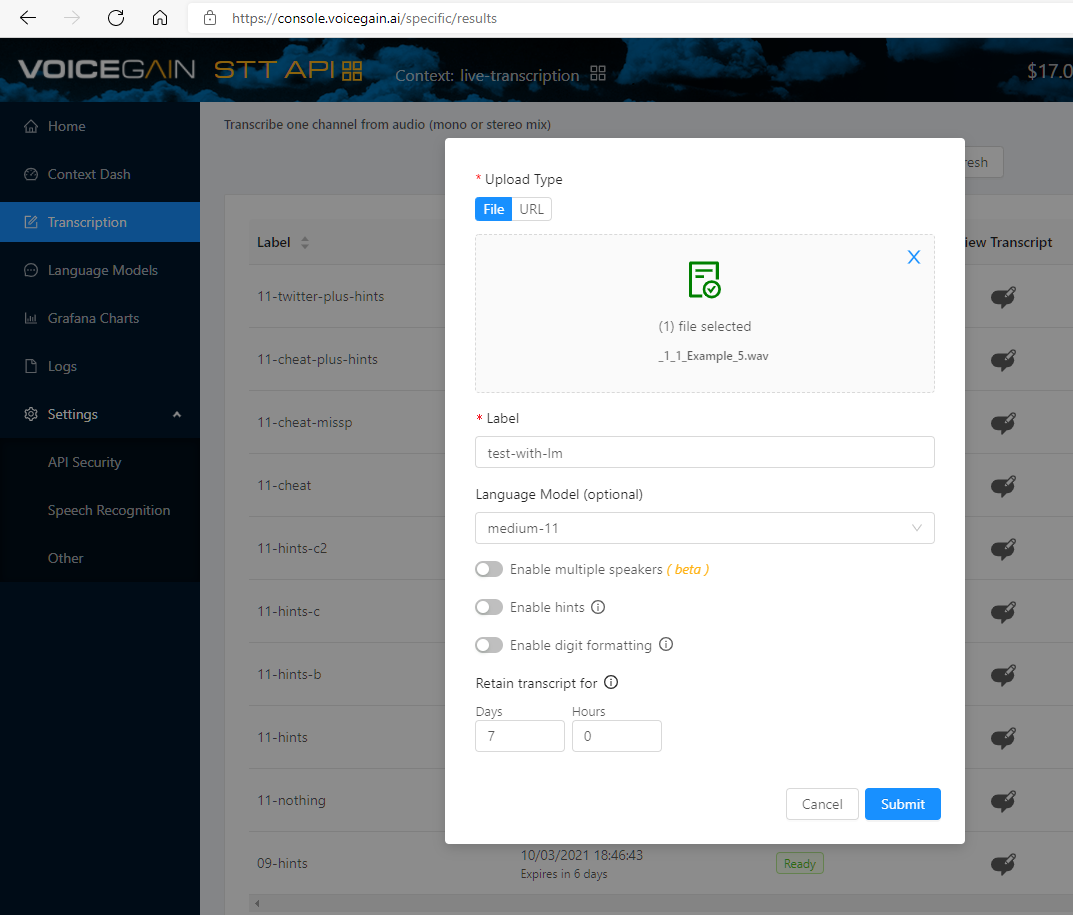
Using Language Models from the Web Console is very easy, you just need to select one in the file upload dialog.
Features coming soon
In addition to the ability to build Language Models from from a list of phrases, soon we will be adding two smaller features to make Language Models more useful in practical applications:
- We will support misspellings - this will be release together with misspellings for Hints. See out description of the function of misspellings in the article about Hints.
- We will add weight to the model - it will control how much power the Language Model has to override the large vocabulary language model contained in the recognizer.
Comments
1 comment
automation testing
Please sign in to leave a comment.